EizoraVideo creation software for AI agents
Video editing software,
built for AI to use.
From structure, footage cuts, 3D, and audio to checks and export. The AI edits; you make the final call.
Operate it from the AI you already use
- Claude Code
- Codex
- Claude Desktop
- Gemini
and other AI agents that support MCP
Showcase
Ask for videos like these, in words.
From product commercials to investor updates, hiring, and music videos. Starting from a standard template, the AI finishes the text, colors, and motion to fit your photos and material, in landscape (16:9) or portrait (9:16).
Drink commercial
Product commercial · light and droplets
Example request「Use this product photo to make a commercial for our new soda」
Property listing
Photos · price and size labels
Example request「Put the layout, size, and price over these room photos to present the property」
New menu at a restaurant
Photos · price and dates
Example request「Use this food photo to announce our new autumn menu」
Town and home introduction
Aerial photo · location callouts
Example request「Label the distance to the station and school on this aerial photo and introduce the town」
Premium product commercial
Product commercial · fabric and light
Example request「Use this perfume photo to make a calm, premium commercial」
Company profile on a globe
Globe · numbers
Example request「Make a company profile that shows our overseas sites as numbers on a globe」
Cinematic title
Light streaks · title
Example request「Announce the release date of our new work in the mood of a film trailer」
Technology company profile
Logo reveal · business intro
Example request「Introduce two of our businesses in a calm blue mood」
There are 39 standard templates. Company names, products, and numbers in the previews are fictional.
Self-check
It doesn't just output. The AI looks, measures, and fixes.
Before export, the actual picture and audio are checked. Each finding comes back to the AI with its location and a fix, and the AI fixes it and checks again.
Example of the check flow
- Voice
- Music
- Text is cut off or hard to tell from the backgroundOverflow · contrast · line breaks
- Music is too loud and buries the voiceLUFS · true peak
- A 3D surface flickersOverlapping faces
- Found text overflow and bad line breaks → fix the layout
- Found voice and music too close in level → fix the volume
- Found overlapping 3D faces → separate the faces
- Checked again → 3 resolved, 0 recurred
- Voice
- Music
Each check is compared with the previous one, recording what was fixed and whether anything recurred in the same place. You start reviewing from a version that is already in order.
How it works
Connect, ask, and review.
Describe the video you want and let AI operate the editor. Review the result and decide what to change.
01 · Connect
Connect your AI agent
Connect Eizora to the AI you already use. There is no editing software to install. With Claude Code it takes one command; with Claude Desktop you register it from the settings screen. The steps are in the guide after you log in.
- 1Add Eizora to your AI agent
- 2Restart your AI agent
- 3Allow the connection
- 4Check that it works
02 · Ask
Describe your video
Describe the video you want and the material to use. The AI plans the structure, assembles picture, text, voice, and subtitles, and saves at each stage.
You → AI “Create a 30-second video introducing this product. Add narration, captions, and a closing slide with a call to action.”
03 · Review
Review, revise, and publish
Watch the preview in the editor and say what to change, with a comment on screen or a request to the AI. Quality checks, export, and publishing to YouTube can be left to it. Your computer stays usable while it exports.
You → AI “Shorten the opening and make the title easier to read. Keep the rest of the video in the same order.”
Features
Real editing software, operated by AI.
The AI operates the same timeline and material you touch in the editor, through MCP. It does not regenerate the whole picture; it edits cuts, text, and audio one by one, so you can fix just the part you want.
Footage editing
Import camera footage and separately recorded audio, then cut from the transcript and from silence. Tracking, face blur, stabilization, and per-cut color and audio correction are included.
Handles multi-gigabyte footage and syncs separately recorded audio
- Import and sync
- Cut from the transcript
- Remove silence
- Tracking and blur
- Color correction and LUTs
Structure, diagrams, subtitles
Give a topic and a length, and the AI writes the structure, script, and slides. Charts, tables, maps, and subtitle tracks per language are included.
39 templates · 28 themes · 12 chart types · 98 fonts
- Create from a request
- Charts and tables
- Maps and globes
- Subtitles in other languages
- Vertical shorts (9:16)
3D and free expression
Add cameras and lights to 3D models and layer particles and light effects. Scenes drawn with HTML, CSS, and JavaScript become video as they are.
69 3D assets · 45 transitions
- 3D models and cameras
- Transitions
- Effects
- Draw freely with HTML
- Keyframes
Voice and music
Generate narration, including dialogue between several speakers. Music ducks only where the voice is, and the AI can create music and sound effects that fit the scene.
4 voice engines · register your own voice
- Narration
- Dialogue
- Your own voice
- Music and sound effects
- Equalizer and reverb
Export and publish
Export at up to 4K and publish to YouTube with a title, description, and subtitles. Export runs on Eizora's servers, so your computer stays free while it renders. Transparent-background export and subtitle files are supported.
4K · 4 codecs · 3 subtitle formats. Exported on our servers
- 4K export
- Transparent export
- SRT · WebVTT · TTML
- GIF and image sequences
- Publish to YouTube
Editor
Hand it to the AI, and still see inside.
Preview, timeline, and script are on one screen. See where and how the AI built things, check it, and decide with your team.
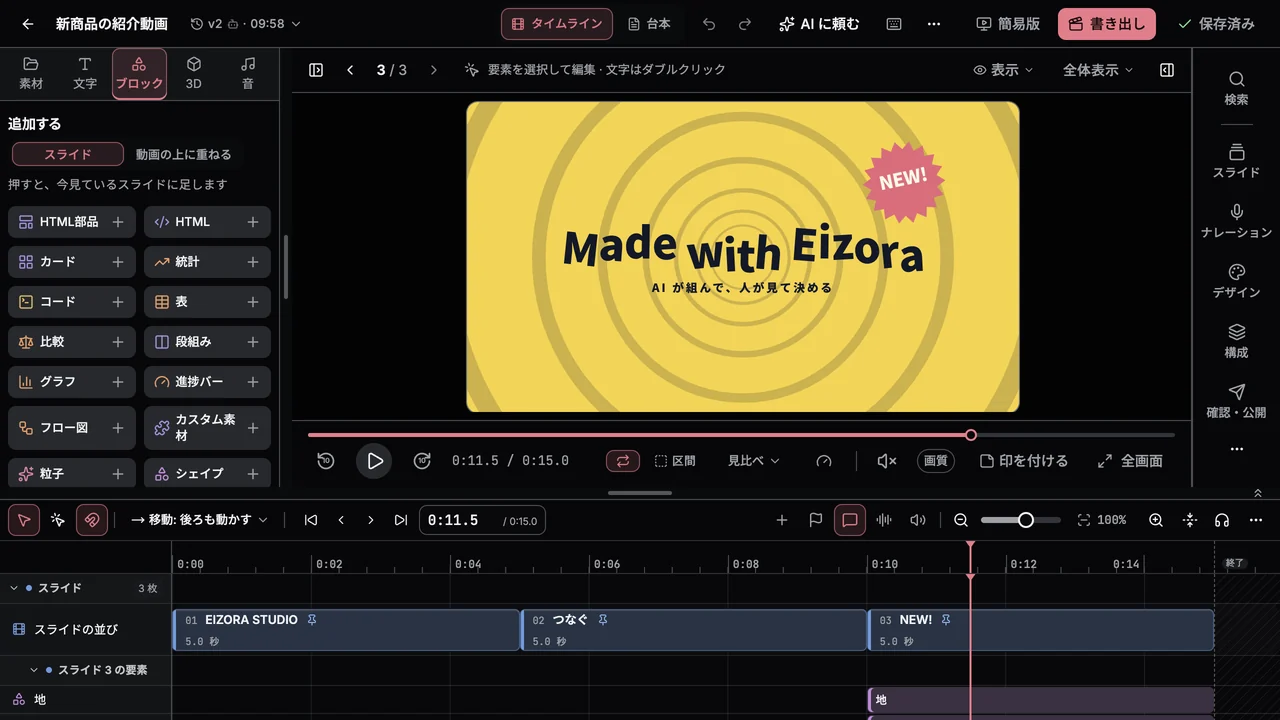
See edits as they happen
Versions saved by AI appear in the open editor. See what changed, compare versions, and restore an earlier version.
Comment at a specific moment
Leave a comment at a timestamp and location on the screen so the agent knows what to change.
Edit directly
Rewrite text on the preview, and change lengths and order on the timeline.
Compare versions and go back
Every save keeps a version. Compare versions by changes, picture, and audio, and restore an earlier one.
Review as a team
Give comments an owner and a status, and mark each slide as reviewed. View-only members can take part.
Works on a phone
You can open the editor from a phone. A simple view focused on playback and comments is also available.
FAQ
FAQ
Which AI agents are supported?
It works with AI agents that support MCP (Model Context Protocol). Setup guides are provided for Claude Code, Codex, and Claude Desktop (claude.ai and the mobile app connect the same way). Guides for Gemini and other AI agents will be added.
Can I make a video myself?
You can create from a blank video or a template in the editor. Text, lengths, order, color, and audio can be edited on screen. Some tasks, such as writing dialogue scripts and splitting subtitles, are done by asking the AI. You can fix what the AI made, and ask the AI to fix what you made.
What are credits used for?
Credits pay for server-side work such as exports, narration, transcription, and media processing. Plan credits are refreshed every month and unused credits do not roll over.
How long do uploaded media and exported videos remain available?
Uploaded media stays until you delete it. Exported videos remain available for your plan’s output retention period.
Can I use exported videos outside YouTube?
Yes. You can download the exported video. Export supports up to 4K and transparent backgrounds. Subtitles can also be saved as SRT, WebVTT, or TTML files.
Do I need a powerful computer or special software?
No. A browser and the AI you already use are enough. Heavy work such as export, voice synthesis, subject cutouts, transcription, and quality checks runs on Eizora's servers. Only the preview in the editor is drawn by your browser, so in scenes with a lot of 3D or effects its smoothness can depend on your device.
Are my uploads and videos used to train AI?
No. Eizora does not use the material you upload or the videos you make to train AI.
Can I use it with a team?
Invite members to share videos and media in a workspace. Assign roles to control who can edit and who can only view.
How do I get started?
Select Apply for access. We’ll review your application and let you know when you can start. Sign in with a Google account.
Does applying cost anything?
No. There is no charge at the time you apply.
Start
Leave the editing to AI. The decisions stay with you.
Access is currently by application. We review each request and let you know when your workspace is ready.